- Access reading lists with direct links, library availability, and private notes.
- Integration with Moodle and cloud management to organize study by weeks or topics.
- Key features: full bibliographic record, favorites, private comments, and reservations.
- Continuous improvement with statistics for teachers and library support via library guides.
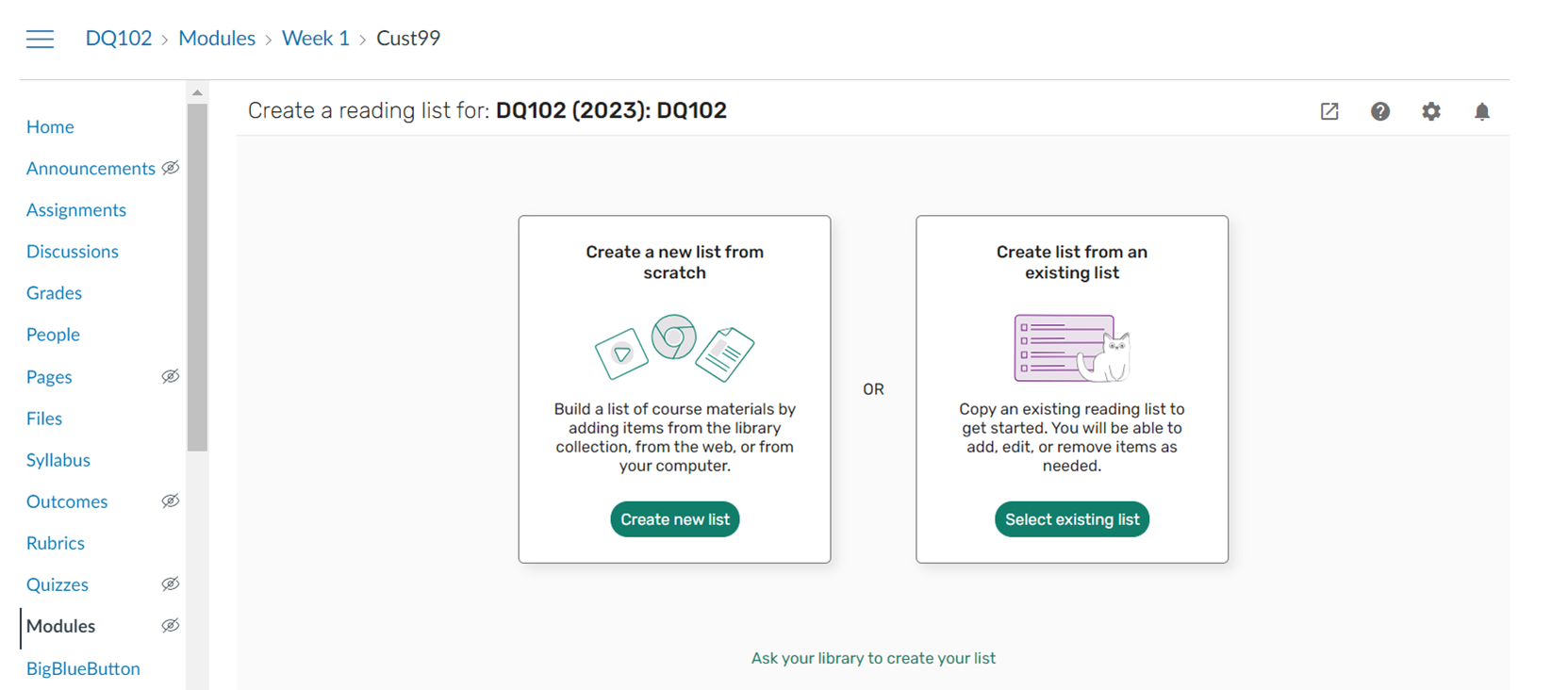
If you've ever wondered how to gather, access, and prioritize all your course readings without getting lost among links and platforms, Leganto makes it easy. This cloud-based solution centralizes your professors' recommended readings in one place, with direct links, library availability information, and options to organize your studies at your own pace. Thanks to its integration with Moodle, you can access it from the virtual campus and consult each resource in just a couple of clicks, significantly improving your academic experience and study time management, with quick access to materials and clearer navigation.
In addition to facilitating access to full documents or the reservation of physical copies, the tool adds practical features for everyday use: personal collections, private annotations, bookmarks, and views by week or topic. This allows you to move from recommendation to action, prioritizing what you need at any given time and recording your ideas and questions. In several universities, including those of Ramon Llull University and university library directories , Leganto has been implemented as a cornerstone for managing bibliographies in a structured, collaborative, and always-available way.
What is Leganto and why should you be interested?
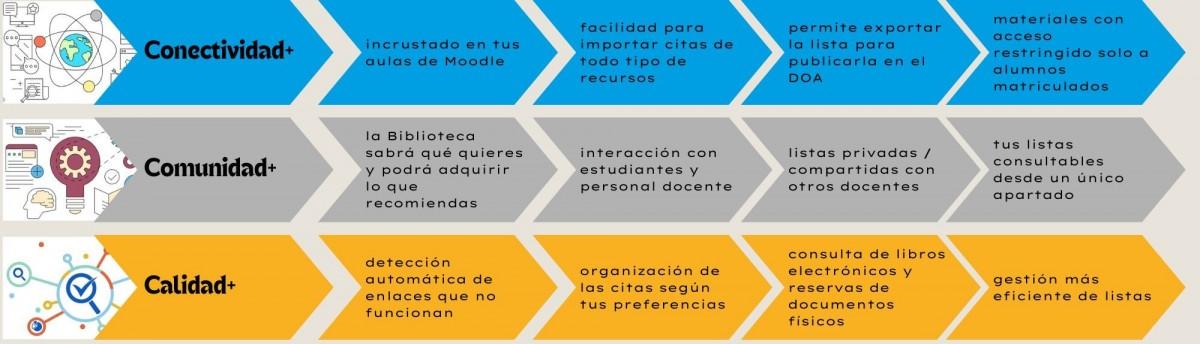
Leganto is a web-based platform designed to centralize recommended reading lists for each subject and make them readily available to students. At institutions like Ramon Llull University, it's used by faculty to create and maintain organized and comprehensive reading lists, linked to the Moodle course management system, while still allowing access through its independent interface. This means that, depending on your preferred study method, you can access your lists and resources through the virtual classroom or directly through the platform.
Faculty members create these lists in the cloud, either individually or with support from the Library Service, and they can include virtually any type of material: printed and electronic books, digitized chapters, academic articles, journals, videos, websites, open access resources, or newspapers. The idea is that, from a single location, you have a complete and up-to-date overview of well-structured, diverse materials , ready to consult or reserve.
For students, the main advantage is immediacy. Many lists are organized by week or topic and display key dates, making reading planning simple and realistic. Furthermore, the platform offers direct links to catalogs, databases, and digital resources, eliminating time-consuming manual searches. Because Leganto is multiplatform, you can take your studies with you and access them from any device, without needing to install anything or worry about complex technical compatibility.
Another important advantage is that Leganto distinguishes between roles. If you identify yourself as a student, you'll see lists associated with your enrolled courses, with access to study-oriented options. If you're a teacher, you'll have permission to create, edit, and organize citations, as well as collaborate with other professors of the same subject. This separation by profile ensures that each person finds exactly what they need, with tools tailored to their role in the course.
Many university libraries have created specific guides to answer frequently asked questions about using Leganto, with clear "ask the library" messages and direct links to the main content to avoid getting lost while navigating. In some cases, these guides also include icon design credits and open licenses (e.g., Creative Commons), reinforcing a culture of responsible reuse and attribution within academia.
At the start of each academic year, various institutions publish welcome messages explaining that Leganto is "your academic reading space" for that year. These messages typically highlight practical advantages: immediate access to full texts when available, the ability to save favorite readings, privately comment on or highlight passages, view course milestones, and work from your mobile phone, tablet, or computer. All of this is designed to help you spend less time searching and more time reading and learning.
Key features in each appointment: links, availability, and details
One of Leganto's most powerful features for students is the detailed information sheet for each resource (also called a recommended resource). From there, you can quickly assess whether the material is useful and how to access it. The "Links and Availability" tab is the starting point, because it clearly shows whether the resource is digital or a physical copy and where to find it. If it's a library book, you'll see its location, call number (classification code), and the copy's status; if it's a digital resource, you'll find a direct link to the document or the platform hosting it, with immediate access when a license is in place.
This distinction between online access and physical materials has a direct impact on your schedule. If you can open a PDF or an online article, you can read it instantly; if you need a printed book, you know exactly which library to go to and whether the copy is available or on loan. Thanks to this accessibility information, it's easier to fit reading into your week and avoid leaving things that require travel or reservations until the last minute.
The second highlighted tab is "Item Details." Here you'll find complete bibliographic information: title, author, publisher, year of publication, ISBN, and other fields that allow you to verify the reference. This is especially useful if you need to cite accurately in academic work or if you want to search for the same material in other catalogs. The quality of the references prevents errors when compiling bibliographies and facilitates the traceability of your sources, which is essential when working with rigorous academic standards.
On that same card, you can add a "Private Note." This feature is invaluable for studying: it allows you to jot down ideas, questions, or reminders related to that resource, and only you can see them. This way, when you return to the resource later, you'll have your own context at hand, with personal notes that save you from rereading sections to remember why it was important. It's a great memory aid and a very convenient way to track your learning.
In addition, many lists include direct links to institutional catalogs or scientific databases, so you don't have to search for names or titles manually. This integration of resources eliminates the need to switch between platforms and reduces friction in the search process, which often makes a difference when you have to combine articles, chapters, and audiovisual material in the same week of study.
From the reading list itself, you can also identify which resources are intended for each thematic unit or week. When a subject is sequenced by topic, you'll see that structure reflected in the list, with groups of citations arranged in order. This makes it easier to compare the syllabus with the readings and check what's due before a seminar, practical session, or assessment, optimizing your effort with clear priorities.
Access from Moodle, integration with Agora and everyday use
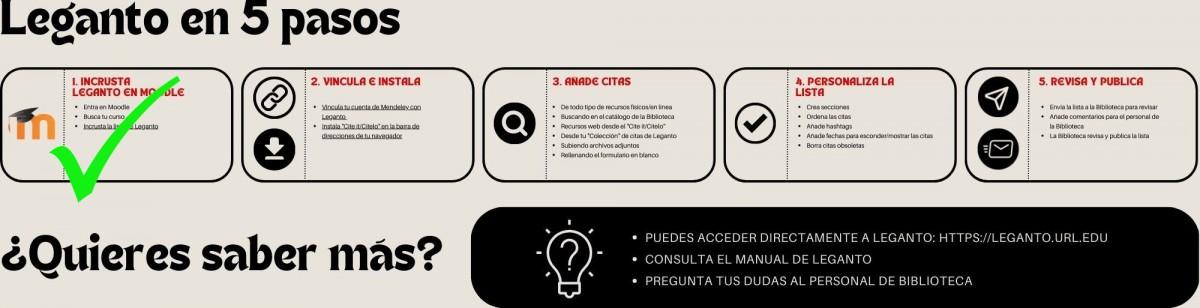
Leganto integrates with Moodle for seamless access. In many subjects, you'll see an icon before the list name indicating the link to Leganto from the campus. Clicking it will take you to the corresponding list, where you can open online documents or reserve a physical copy in just a couple of clicks, reducing the time between seeing the recommendation and starting to read. This immediate accessibility, along with organization by week or topic, helps you study at your own pace and with continuity.
If you prefer, you can also access Leganto directly through its web interface. After logging in, you will see the lists associated with your enrolled courses. In some institutions, access is granted using your full institutional email address (for example, your IQS email) and password. This authentication ensures that each student sees only the information relevant to them and has access to the features they need to organize their studies, such as saving favorites or taking notes.
Faculty members have access to specific tools for creating, managing, and sharing lists, as well as coordinating with other instructors teaching the same subject. This ensures consistent and up-to-date bibliographies throughout the course. There is one important operational detail: if a list was already linked to the institutional platform (such as Agora) in the previous academic year, it is recommended that for the 25/26 academic year, the previous list be unlinked and relinked. This ensures that the new course version does not carry over old configurations and that everything is perfectly synchronized.
From the list view, the "Statistics" option allows teaching teams to see how resources are actually being used: how often they are consulted, which materials are most popular, etc. This information helps improve selections and balance the reading load. For students, although it's not always directly displayed, this continuous improvement translates into more refined lists with resources that provide pedagogical value.
For everyday study, Leganto offers several useful features: saving favorite readings and organizing them by course, privately commenting on or highlighting passages (annotations are not public; only you can see them), checking key dates when the list is sequenced by week, and accessing direct links to catalogs and databases. Thanks to its web design, you can access it from any device and track your progress, wherever you are, with the library just a click away.
Among the benefits highlighted by various university library guides are instant access to full texts when the license allows, management of printed copies, and direct links to digital resources without intermediaries. All of this, combined with the clarity of each entry and the organization by topic, makes the transition from "seeing the recommendation" to "reading the resource" as quick as possible, fostering a more efficient learning experience.
If you have any questions, remember that many libraries offer specific support for Leganto. They usually include a visible section such as "Do you have questions? Contact the library," with support forms or email addresses. It's also common to find notes about open licenses and design credits (for example, Freepik icons with CC licenses), a reminder that the university promotes the responsible use of materials, and the practice of properly citing sources.
Practical features that make the difference
- Quick access: Open the full text when available or manage the reserve the physical copy Bluntly.
- Clear organization: lists by week or topic with dates and milestones to locate you quickly.
- Personal work: create collections, save favorites, and add private notes without anyone else seeing them.
- Connectivity: direct links to catalogs and databases to expand or compare information.
Conditional display in Moodle and how it affects your pace
In some courses, instructors manage access to resources and activities using Moodle's conditional display settings. This means that certain materials appear while others remain hidden depending on your progress, adjusting the workload to the learning sequence. This configuration prevents you from feeling overwhelmed at the beginning and guides you step by step, although it can be limiting for those who want to progress more quickly, as they may sometimes have to wait for new content to become available.
The key is to balance autonomy with support. As the course gradually releases materials, Leganto helps you make the most of what's available at each stage: you'll see what you can read now (with its link or location) and what will be left for later. Since many lists include dates and milestones, you'll have a clear roadmap and can combine what's already available with prior or supplementary readings that the instructor has included as optional resources.
If your course has strict requirements, use the "Certificate Details" tab to prepare bibliographies and references, especially as assignments or exams approach. You can also leave private notes for each session with questions or ideas for class discussion. That way, when the content is unlocked, you'll have your notes at hand and can jump straight to the important stuff.
There are PDF tutorials and videos explaining how conditional release works and how to plan your studies accordingly. Ask for these materials at your library or university, as they are usually available in the course guides and will give you tips on how to balance the course schedule with your own learning strategies.
Best practices for getting the most out of Leganto
Start each week by reviewing the course list and using the filters or thematic sections to find what's next. When you find a key resource, save the quote to your favorites. At the end of the day, add a private note about what you learned or what you still need to check. With this small habit, you'll turn Leganto into your reading log, with contextual clues that will save you time later.
If you're working in a group, agree on a protocol: for example, each person saves their most relevant readings to their favorites and jots down questions in private notes to later add them to the shared document. Although Leganto notes aren't shared, using them as personal reminders is ideal before your group discussions. This increases efficiency and reduces repetition, as you'll be relying on well-documented evidence.
When the resource is a physical copy, check its condition and plan your library visit in advance. If it coincides with a due date, try to reserve it or look for digital alternatives on the same list, as instructors often include electronic versions or supplementary resources. Keeping your reading plan manageable prevents last-minute bottlenecks and helps maintain a sustainable study pace.
Finally, if you notice a broken link or missing information in the record, please report it through the library's contact channels or to the instructor. Feedback helps improve the lists and benefits the entire class. Remember that Leganto is a dynamic tool, with ongoing updates and maintenance, and that some universities recommend unlinking and relinking lists in the LMS from course to course (for example, from Agora to the new 25/26 edition) to keep everything clean and up-to-date.
Support, bibliographic guides and citation culture
Many university libraries publish specific guides to Leganto. These guides typically include direct access to the main content and a "Questions? Ask the library" section for quick assistance. You'll also find references to open licenses and design credits (such as Creative Commons licensed icons), helpful reminders to cite correctly and respect the terms of use for each resource in your academic work. This culture of citation and licensing is part of university life and aligns with the philosophy of using and sharing knowledge responsibly.
If this is your first time using Leganto, we recommend exploring the help sections of your library and, if available, the teacher and student handbook. While many features are intuitive, discovering little tricks—like searching by tag, creating collections, or better understanding availability—can save you hours throughout the semester. The sooner you incorporate Leganto into your study routine, the more you'll benefit from its combination of shortcuts and organization.
Leganto lets you view each citation in detail, access links and availability, take private notes, save favorites, and access it from Moodle or the web on any device. With its combination of topic-based organization, statistics for faculty, catalog links, and library integration, it becomes an invaluable tool for focused study, eliminating time wasted on repetitive searches and ensuring access to academic references. Furthermore, if your course uses conditional reading, the tool fits seamlessly into a well-planned sequence, where you always know what you can read now, what remains to be opened, and how to organize yourself to tackle everything calmly and efficiently.
